Identify Culturally Dependent Data
To internationalize an application, the first thing you need to do is identify
the culturally dependent data in your application. Culturally-dependent data is
any data that varies from one culture or country to another. Text is the most
obvious and pervasive example of culturally dependent data, but other things
like number formats, sounds, times, and dates should be considered too.
The RMIClient1
and RMIClient2 classes have culturally-dependent data visible
to the user. This data is included in the bullet list below. Figure 1
Culturally-Dependent Data. shows the Fruit Order client, which displays some of
the culturally-dependent data mentioned in the bullet list.
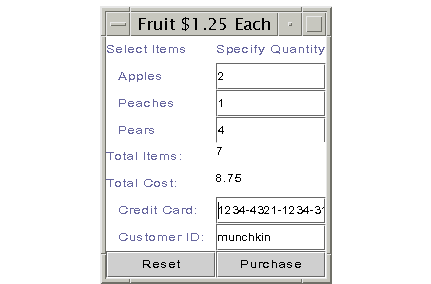
Figure 1: Culturally-Dependent Data
- Titles and labels
(window titles, column heads, and left column labels)
- Buttons (Purchase,
Reset, View)
- Numbers (values for item
and cost totals)
- Error messages
Although the application has a server program, the server program is not being
internationalized and localized. The only visible culturally-dependent data in
the server program is the error message text. The server program runs in one
place and the assumption is that it is not seen by anyone other than the system
administrator who understands the language in which the error messages is hard
coded. In this example, that language is United States English.
All error messages in the RMIClient1 and
RMIClient2 programs are handled in try
and catch blocks. This way you have access to the error
text for translation into another language.
//Access to error text
  public void someMethod(){
    try {
      //do something
     } catch (java.util.NoSuchElementException {
     System.out.println("Print some error text");
  }
Methods can be coded to declare the exception in their
throws
clause, but this way you cannot access the error message text thrown when the
method tries to access unavailable data in the set. In this case, the
system-provided text for this error message is sent to the command line
regardless of the locale in use for the application. The point here is it is
always better to use try and catch
blocks wherever possible if there is any chance the application will be
internationalized so you can access and localize the error message text.
//No access to error text
  public void someMethod()
	throws java.util.NoSuchElementException{
    //do something
  }
Here is a list of the title, label, button, number, and error text visible to
the user, and therefore, subject to internationalization and localization. This
data was taken from both the RMIClient1 and
RMIClient2 classes.
- Labels: Apples, Peaches,
Pears, Total Items, Total Cost, Credit Card, Customer ID
- Titles: Fruit $1.25
Each, Select Items, Specify Quantity
- Buttons: Reset, View,
Purchase
- Number Values: Value for
total items, Value for total cost
- Errors: Invalid Value,
Cannot send data to server, Cannot look up remote server object, No data
available, No customer IDs available, Cannot access data in server
Back to Top
Create Keyword and Value Pair Files
Because all text visible to the user will be moved out of the application and
translated, your application needs a way to access the translated text during
execution. This is done with properties files that specify a list of keyword
and value pairs for each language to be used. The application code loads the
properties file for a given language and references the keywords instead of
using hard-coded text.
So for example, you could map the keyword purchase to Kaufen in the German
file, Achetez in the French file, and Purchase in the United States English
file. In your application, you load the properties file for the language you
want to use and reference the keyword purchase in your code. During execution
when the purchase keyword is encountered, Achetez, Kaufen, or Purchase is
loaded depending on the language file in use.
Keyword and value pairs are stored in properties files because they contain
information about a program's properties or characteristics. Property files are
plain-text format, and you need one file for each language you intend to
use.
In this example, there are three properties files, one each for the English,
French, and German translations. Because this application currently uses
hard-coded English text, the easiest way to begin the internationalization
process is to use the hard-coded text to set up the key and value pairs for the
English properties file.
The properties files follow a naming convention so the application can locate
and load the correct file at run time. The naming convention uses language and
country codes which you should make part of the file name. Both the language
and country are included because the same language can vary between countries.
For example, United States English and Australian English are a little
different, and Swiss German and Austrian German both differ from each other and
from the German spoken in Germany.
These are the names of the properties files for the German
(de_DE), French (fr_FR), and American English
(en_US) translations where de, fr, and
en indicate the German (Deutsche), French, and English languages;
and DE, FR, and US
indicate Germany (Deutschland), France, and the United States:
- MessagesBundle_de_DE.properties
- MessagesBundle_en_US.properties
- MessagesBundle_fr_FR.properties
This is the English language properties file. Keywords are to the left of the
equals (=) sign, and text values are on the right.
  apples = Apples:
  peaches = Peaches:
  pears = Pears:
  items = Total Items:
  cost=Total Cost:
  card=Credit Card:
  customer=Customer ID:
  title=Fruit 1.25 Each
  1col=Select Items
  2col=Specify Quantity
  reset=Reset
  view=View
  purchase = Purchase
  invalid = Invalid Value
  send = Cannot send data to server
  nolookup = Cannot look up remote server object
  nodata = No data available
  noID = No customer IDs available
  noserver = Cannot access data in server
You can hand this file off to your French and German translators and ask them
to provide the French and German equivalents for the text to the right of the
equals (=) sign. Keep a copy because you will need the keywords to
internationalize your application text.
The properties file with German translations produces the fruit order client
user interface shown in Figure 2: German User Interface..
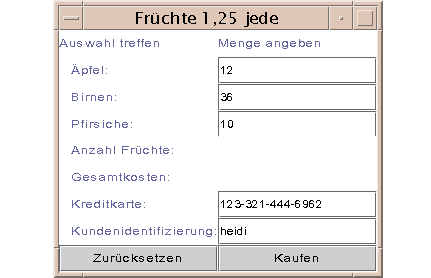
Figure 2: German User Interface
Back to Top
German Translations
  apples=Äpfel:
  peaches=Birnen:
  pears=Pfirsiche:
  items=Anzahl Früchte:
  cost=Gesamtkosten:
  card=Kreditkarte:
  customer=Kundenidentifizierung:
  title=Früchte 1,25 jede
  1col=Auswahl treffen
  2col=Menge angeben
  reset=Zurücksetzen
  view=Sehen Sie an
  purchase=Kaufen
  invalid=Ungültiger Wert
  send=Datenübertragung zum Server nicht möglich
  nolookup=Das Server läßt sich nicht zu finden
  nodata=Keine Daten verfügbar
  noID=Keine Kundenidentifizierungen verfügbar
  noserver=Kein Zugang zu den Daten beim Server
The properties file with French translations produces the fruit order client
user interface shown in Figure 3: French User Interface.
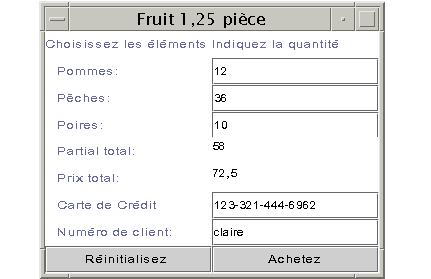
Figure 3: French User Interface
French Translations
  apples=Pommes:
  peaches=Pêches:
  pears=Poires:
  items=Partial total:
  cost=Prix total:
  card=Carte de Crédit
  customer=Numêro de client:
  title=Fruit 1,25 pièce
  1col=Choisissez les éléments
  2col= Indiquez la quantité
  reset=Réinitialisez
  view=Visualisez
  purchase=Achetez
  invalid=Valeur incorrecte
  send=Les données n'ont pu être envoyées au serveur
  nolookup=Accès impossible à l'objet du serveur distant
  nodata=Aucune donnée disponible
  noID=dentifiant du client indisponible
  noserver=Accès aux données du serveur impossible
Internationalize Application Text
This section walks through internationalizing theRMIClient1 code.
The RMIClient2 code is almost identical so you can apply the same
steps to that program on your own.
Instance Variables
In addition to adding an import statement for thejava.util.*
package where the internationalization classes are, this program needs the
following instance variable declarations for the internationalization
process:
  //Initialized in main method
    static String language, country;
    Locale currentLocale;
    static ResourceBundle messages;
  //Initialized in actionPerformed method
    NumberFormat numFormat;
main Method
The program is designed so the user specifies thelanguage to use at the command
line. So, the first change to the main method is to add the code
to check the command
line parameters. Specifying the language at the command line means once the
application is internationalized, you can easily change the language without
recompiling.
Note:
This style of programming makes it possible for the same user to run the
program in different languages, but in most cases, the program will use one
language and not rely on command-line arguments to set the country and
language.
The String[] args parameter to the main
method contains arguments passed to the program from the command line. This
code expects 3 command line arguments when the user wants a language other than
English. The first argument is the name of the machine on which the program is
running. This value is passed to the program when it starts and is needed
because this is a networked program using the RMI API.
The other two arguments specify the language and country codes. If the program
is invoked with 1 command line argument (the machine name only), the country
and language are assumed to be United States English.
As an example, here is how the program is started with command line arguments
to specify the machine name and German language (de DE). Everything goes on one
line.
  java -Djava.rmi.server.codebase=
  	http://kq6py/~zelda/classes/
  	-Djava.security.policy=java.policy
  	RMIClient1 kq6py.eng.sun.com de DE
The main method code
appears below. The currentLocale instance variable is
initialized from the language and country
information passed in at the command line, and the messages
instance variable is initialized from the currentLocale.
The messages object provides
access to the translated text for the language in use. It takes two parameters:
the first parameter
MessagesBundle is the prefix of the family of
translation files this application uses, and the second parameter
is the Locale object that tells the ResourceBundle
which translation to use. If the application is invoked with
de DE command line parameters, this code creates a
ResourceBundle variable to access the
MessagesBundle_de_DE.properties file.
public static void main(String[] args){
//Check for language and country codes
 if (args.length != 3) {
    language = new String("en");
    country = new String ("US");
    System.out.println("English");
  } else {
    language = new String(args[1]);
    country = new String(args[2]);
    System.out.println(language + country);
  }

//Create locale and resource bundle
  currentLocale = new Locale(language, country);
  messages = ResourceBundle.getBundle(
	"MessagesBundle", currentLocale);
  WindowListener l = new WindowAdapter() {
  public void windowClosing(WindowEvent e) {
	System.exit(0);
  }
 };

//Create the RMIClient1 object
  RMIClient1 frame = new RMIClient1();
  frame.addWindowListener(l);
  frame.pack();
  frame.setVisible(true);
  if (System.getSecurityManager() == null) {
    System.setSecurityManager(new RMISecurityManager());
  }

  try {
    String name = "//" + args[0] + "/Send";
    send = ((Send) Naming.lookup(name));
  } catch (java.rmi.NotBoundException e) {
    System.out.println(messages.getString("nolookup"));
  } catch(java.rmi.RemoteException e) {
    System.out.println(messages.getString("nolookup"));
  } catch(java.net.MalformedURLException e) {
    System.out.println(messages.getString("nolookup"));
  }
}
The applicable error text is accessed by calling
the getString method on the ResourceBundle,
and passing it the keyword that maps to the applicable error text.
  try {
    String name = "//" + args[0] + "/Send";
    send = ((Send) Naming.lookup(name));
  } catch (java.rmi.NotBoundException e) {
    System.out.println(messages.getString("nolookup"));
  } catch(java.rmi.RemoteException e) {
    System.out.println(messages.getString("nolookup"));
  } catch(java.net.MalformedURLException e) {
    System.out.println(messages.getString("nolookup"));
  }
Back to Top
Constructor
The window title is set by calling the
getString method on the ResourceBundle,
and passing it the keyword that maps to the title text. You
must pass the keyword exactly as it appears in the translation
file, or you will get a runtime error indicating the resource
is unavailable.
  RMIClient1(){
  //Set window title
    setTitle(messages.getString("title"));
  }
The next thing the constructor does is use the args
parameter to look up the remote server object. If there are any
errors in this process, the catch statements get the
applicable error text from the ResourceBundle
and print it to the command line. User interface objects that
display text, such as JLabel and JButton,
are created the same way:
//Create left and right column labels
  col1 = new JLabel(messages.getString("1col"));
  col2 = new JLabel(messages.getString("2col"));
   ...
//Create buttons and make action listeners
  purchase = new JButton(messages.getString("purchase"));
  purchase.addActionListener(this);
  reset = new JButton(messages.getString("reset"));
  reset.addActionListener(this);
actionPerformed Method
In the actionPerformed method, the Invalid Value
error is caught and translated. The actionPerformed method also
calculates item and cost totals, translates them to the correct format for the
language currently in use, and displays them in the user interface.
  if (order.apples.length() > 0) {
  //Catch invalid number error
    try {
      applesNo = Integer.valueOf(order.apples);
      order.itotal += applesNo.intValue();
    } catch(java.lang.NumberFormatException e) {
      appleqnt.setText(messages.getString("invalid"));
    }
  } else {
    /* else no need to change the total */
  }
Internationalize Numbers
A NumberFormat object is used to
translate numbers to the correct format for the language currently in use. A
NumberFormat object is created from the
currentLocale. The information in the currentLocale
tells the NumberFormat object what number format to use.
Once you have a NumberFormat
object, all you do is pass in the value you want translated, and you receive a
String
that contains the number in the correct format. The value can be passed in as
any data type used for numbers such as int,
Integer, double, or Double.
No code to convert an Integer to an int
and back again is needed.
//Create number formatter<
  numFormat =
	NumberFormat.getNumberInstance(currentLocale);
//Display running total
  text = numFormat.format(order.itotal);
  this.items.setText(text);
//Calculate and display running cost
  order.icost = (order.itotal * 1.25);
  text2 = numFormat.format(order.icost);
  this.cost.setText(text2);
try {
    send.sendOrder(order);
} catch (java.rmi.RemoteException e) {
  System.out.println(messages.getString("send"));
} catch (java.io.IOException e) {
  System.out.println("nodata");
}
Compile and Run the Application
Here are the summarized steps for compiling and running the example program.
The complete code listings are in Code for This Lesson. The
important thing is when you start the client programs, include language and
country codes if you want a language other than United States English.
Compile
Unix:
cd /home/zelda/classes
javac Send.java
javac RemoteServer.java
javac RMIClient2.java
javac RMIClient1.java
rmic -d . RemoteServer
cp RemoteServer*.class /home/zelda/public_html/classes
cp Send.class /home/zelda/public_html/classes
cp DataOrder.class /home/zelda/public_html/classes
Win32:
javac Send.java
javac RemoteServer.java
javac RMIClient2.java
javac RMIClient1.java
rmic -d . RemoteServer
copy RemoteServer*.class \home\zelda\public_html\classes
copy Send.class \home\zelda\public_html\classes
copy DataOrder.class \home\zelda\public_html\classes
Start the RMI Registry
Unix:
cd /home/zelda/public_html/classes
unsetenv CLASSPATH
rmiregistry &
Win32:
cd \home\zelda\public_html\classes
set CLASSPATH=
start rmiregistry
Start the Server
Unix:
cd /home/zelda/public_html/classes
java -Djava.rmi.server.codebase=http://kq6py/~zelda/classes
     -Dtava.rmi.server.hostname=kq6py.eng.sun.com
     -Djava.security.policy=java.policy RemoteServer
Win32:
cd \home\zelda\public_html\classes
java -Djava.rmi.server.codebase=
	file:c:\home\zelda\public_html\classes
     -Djava.rmi.server.hostname=kq6py.eng.sun.com
     -Djava.security.policy=java.policy RemoteServer
Start the RMIClient1 Program in German
Note the addition ofde DE
for the German language and country at the end of the line.
Unix:
cd /home/zelda/classes
java -Djava.rmi.server.codebase=
	http://kq6py/~zelda/classes/
     -Djava.security.policy=
	java.policy RMIClient1 kq6py.eng.sun.com de DE
Win32:
cd \home\zelda\classes
java -Djava.rmi.server.codebase=
	file:c:\home\zelda\classes\
     -Djava.security.policy=
	java.policy RMIClient1 kq6py.eng.sun.com de DE
Start the RMIClient2 Program in French
Note the addition of fr FR for the French language and country at
the end of the line.
Unix:
cd /home/zelda/classes
java -Djava.rmi.server.codebase=
	http://kq6py/~zelda/classes
     -Djava.rmi.server.hostname=kq6py.eng.sun.com
     -Djava.security.policy=
	java.policy RMIClient2 kq6py.eng.sun.com fr FR
Win32:
cd \home\zelda\classes
java -Djava.rmi.server.codebase=
	file:c:\home\zelda\public_html\classes
     -Djava.rmi.server.hostname=kq6py.eng.sun.com
     -Djava.security.policy=
	java.policy RMIClient2
	kq6py.eng.sun.com/home/zelda/public_html fr FR
Back to Top
Exercises
A real-world scenario for an ordering application like this might be that
RMIClient is an applet embedded in a web page. When
orders are submitted, order processing staff run RMIClient2
as applications from their local machines.
So, an interesting exercise is to convert the RMIClient1 class to
its applet equivalent. The translation files would be loaded by the applet from
the same directory from which the browser loads the applet class.
One way is to have a separate applet for each language with the language and
country codes hard coded. Your web page can let them choose a language by
clicking a link that launches a web page with the appropriate applet. The
source code files for the English, French, and German applets starts in the
Application Code: RMIFrenchApp section in
the Code Listings appendix.
This is the HTML code to load the French applet on a web page.
<HTML>
<BODY>
<APPLET CODE=RMIFrenchApp.class WIDTH=300 HEIGHT=300>
</APPLET>
</BODY>
</HTML>
Note:
To run an applet written with Java 2 APIs in a browser, the browser must be
enabled for the Java 2 Platform. If your browser is not enabled for the Java 2
Platform, you have to use appletviewer to run the applet or install Java
Plug-in
(http://java.sun.com/products/plug-in/index.html).
Java Plug-in lets you run applets on web pages under the 1.2 version of the
Java virtual machine (Java VM) instead of the web browser's default Java VM
To use appletviewer, type the following where
rmiFrench.html is the HTML file for the French applet.
appletviewer rmiFrench.html
Another improvement to the program as it currently stands would be enhancing
the error message text. You can locate the errors in the Java API docs
(http://java.sun.com/products/jdk/1.2/docs/api/index.html) and use
the information there to make the error message text user friendly by providing
more specific information.
You might also want to adapt the client programs to catch and handle the error
thrown when an incorrect keyword is used. This is the stack trace provided by
the system when this type of error occurs:
  Exception in thread "main"
  java.util.MissingResourceException: Can't find resource
  at java.util.ResourceBundle.getObject(Compiled Code) at
  java.util.ResourceBundle.getString(Compiled Code)
  at RMIClient1.<init>(Compiled Code)
  at RMIClient1.main(Compiled Code)
More Information
You can find more information on Internationalization in the
Internationalization section in The Java Tutorial Continued ISBN
0-201-48558-3.
You can find more information on applets in the Writing Applets section
in The Java Tutorial, ISBN 0-2-1-31007-4.
Code for This Lesson
- RMIClient1
- RMIClient2
- RMIFrenchApp
RMIClient1
import java.awt.Color;
import java.awt.GridLayout;
import java.awt.event.*;
import javax.swing.*;
import java.io.*;
import java.net.*;
import java.rmi.*;
import java.rmi.server.*;
import java.util.*;
import java.text.*;

class RMIClient1 extends JFrame
		implements ActionListener {
   JLabel col1, col2;
   JLabel totalItems, totalCost;
   JLabel cardNum, custID;
   JLabel applechk, pearchk, peachchk;
   JButton purchase, reset;
   JPanel panel;
   JTextField appleqnt, pearqnt, peachqnt;
   JTextField creditCard, customer;
   JTextArea items, cost;
   static Send send;

//Internationalization variables
   static Locale currentLocale;
   static ResourceBundle messages;
   static String language, country;
   NumberFormat numFormat;

   RMIClient1() { //Begin Constructor
     setTitle(messages.getString("title"));
//Create left and right column labels
     col1 = new JLabel(messages.getString("1col"));
     col2 = new JLabel(messages.getString("2col"));

//Create labels and text field components
     applechk = new
	JLabel("   " + messages.getString("apples"));
     appleqnt = new JTextField();
     appleqnt.addActionListener(this);
     pearchk = new
	JLabel("   " + messages.getString("pears"));
     pearqnt = new JTextField();
     pearqnt.addActionListener(this);
     peachchk = new
	JLabel("   " + messages.getString("peaches"));
     peachqnt = new JTextField();
     peachqnt.addActionListener(this);
     cardNum = new
	JLabel("   " + messages.getString("card"));
     creditCard = new JTextField();
     pearqnt.setNextFocusableComponent(creditCard);
     customer = new JTextField();
     custID = new
	JLabel("   " + messages.getString("customer"));

//Create labels and text area components
     totalItems = new
	JLabel("   " + messages.getString("items"));
     totalCost = new
	JLabel("   " + messages.getString("cost"));
     items = new JTextArea();
     cost = new JTextArea();

//Create buttons and make action listeners
     purchase = new
	JButton(messages.getString("purchase"));
     purchase.addActionListener(this);
     reset = new JButton(messages.getString("reset"));
     reset.addActionListener(this);

//Create a panel for the components
     panel = new JPanel();

//Set panel layout to 2-column grid
//on a white background
     panel.setLayout(new GridLayout(0,2));
     panel.setBackground(Color.white);

//Add components to panel columns
//going left to right and top to bottom
     getContentPane().add(panel);
     panel.add(col1);
     panel.add(col2);
     panel.add(applechk);
     panel.add(appleqnt);
     panel.add(peachchk);
     panel.add(peachqnt);
     panel.add(pearchk);
     panel.add(pearqnt);
     panel.add(totalItems);
     panel.add(items);
     panel.add(totalCost);
     panel.add(cost);
     panel.add(cardNum);
     panel.add(creditCard);
     panel.add(custID);
     panel.add(customer);
     panel.add(reset);
     panel.add(purchase);
   } //End Constructor

  public void actionPerformed(ActionEvent event) {
   Object source = event.getSource();
   Integer applesNo, peachesNo, pearsNo, num;
   Double cost;
   String text, text2;
   DataOrder order = new DataOrder();

//If Purchase button pressed
   if (source == purchase) {
//Get data from text fields
    order.cardnum = creditCard.getText();
    order.custID = customer.getText();
    order.apples = appleqnt.getText();
    order.peaches = peachqnt.getText();
    order.pears = pearqnt.getText();
//Calculate total items
    if (order.apples.length() > 0) {
//Catch invalid number error
      try {
        applesNo = Integer.valueOf(order.apples);
        order.itotal += applesNo.intValue();
      } catch (java.lang.NumberFormatException e) {
        appleqnt.setText(messages.getString("invalid"));
      }
    } else {
      /* else no need to change the total */
    }

    if (order.peaches.length() > 0) {
//Catch invalid number error
      try {
        peachesNo = Integer.valueOf(order.peaches);
        order.itotal += peachesNo.intValue();
      } catch(java.lang.NumberFormatException e) {
        peachqnt.setText(messages.getString("invalid"));
      }
    } else {
      /* else no need to change the total */
    }
    if (order.pears.length() > 0){
//Catch invalid number error
      try {
        pearsNo = Integer.valueOf(order.pears);
        order.itotal += pearsNo.intValue();
      } catch (java.lang.NumberFormatException e) {
        pearqnt.setText(messages.getString("invalid"));
      }
    } else {
      /* else no need to change the total */
    }

//Create number formatter
     numFormat =
	NumberFormat.getNumberInstance(currentLocale);
//Display running total
     text = numFormat.format(order.itotal);
     this.items.setText(text);
//Calculate and display running cost
     order.icost = (order.itotal * 1.25);
     text2 = numFormat.format(order.icost);
     this.cost.setText(text2);
     try{
        send.sendOrder(order);
      } catch (java.rmi.RemoteException e) {
          System.out.println(messages.getString("send"));

      } catch (java.io.IOException e) {
        System.out.println("Unable to write to file");
      }
   }

//If Reset button pressed
//Clear all fields
    if (source == reset) {
     creditCard.setText("");
     appleqnt.setText("");
     peachqnt.setText("");
     pearqnt.setText("");
     creditCard.setText("");
     customer.setText("");
     order.icost = 0;
     cost = new Double(order.icost);
     text2 = cost.toString();
     this.cost.setText(text2);
     order.itotal = 0;
     num = new Integer(order.itotal);
     text = num.toString();
     this.items.setText(text);
    }
  }

  public static void main(String[] args) {
    if (args.length != 3) {
      language = new String("en");
      country = new String ("US");
      System.out.println("English");
    } else {
      language = new String(args[1]);
      country = new String(args[2]);
      System.out.println(language + country);
    }
    currentLocale = new Locale(language, country);
    messages = ResourceBundle.getBundle(
		"MessagesBundle", currentLocale);
    WindowListener l = new WindowAdapter() {
      public void windowClosing(WindowEvent e) {
        System.exit(0);
      }
    };
    RMIClient1 frame = new RMIClient1();
    frame.addWindowListener(l);
    frame.pack();
    frame.setVisible(true);
    if(System.getSecurityManager() == null) {
      System.setSecurityManager(new
		RMISecurityManager());
    }
    try {
      String name = "//" + args[0] + "/Send";
      send = ((Send) Naming.lookup(name));
    } catch (java.rmi.NotBoundException e) {
      System.out.println(messages.getString("nolookup"));
    } catch(java.rmi.RemoteException e){
      System.out.println(messages.getString("nolookup"));
    } catch(java.net.MalformedURLException e) {
      System.out.println(messages.getString("nolookup"));
    }
  }
}
RMIClient2
import java.awt.Color;
import java.awt.GridLayout;
import java.awt.event.*;
import javax.swing.*;
import java.io.*;
import java.net.*;
import java.rmi.*;
import java.rmi.server.*;
import java.io.FileInputStream.*;
import java.io.RandomAccessFile.*;
import java.io.File;
import java.util.*;
import java.text.*;

class RMIClient2 extends JFrame
		implements ActionListener {
   JLabel creditCard, custID, apples, peaches,
	pears, total, cost, clicked;
   JButton view, reset;
   JPanel panel;
   JTextArea creditNo, customerNo, applesNo,
	peachesNo, pearsNo, itotal, icost;
   static Send send;
   String customer;
   Set s = new HashSet();
   RMIClient2 frame;

//Internationalization variables
   static Locale currentLocale;
   static ResourceBundle messages;
   static String language, country;
   NumberFormat numFormat;

   RMIClient2(){ //Begin Constructor
     setTitle(messages.getString("title"));
//Create labels
     creditCard = new
	JLabel(messages.getString("card"));
     custID = new
	JLabel(messages.getString("customer"));
     apples = new
	JLabel(messages.getString("apples"));
     peaches = new
	JLabel(messages.getString("peaches"));
     pears = new
	JLabel(messages.getString("pears"));
     total = new
	JLabel(messages.getString("items"));
     cost = new JLabel(messages.getString("cost"));

//Create text areas
     creditNo = new JTextArea();
     customerNo = new JTextArea();
     applesNo = new JTextArea();
     peachesNo = new JTextArea();
     pearsNo = new JTextArea();
     itotal = new JTextArea();
     icost = new JTextArea();

//Create buttons
     view = new
	JButton(messages.getString("view"));
     view.addActionListener(this);
     reset = new
	JButton(messages.getString("reset"));
     reset.addActionListener(this);

//Create panel for 2-column layout
//Set white background color
     panel = new JPanel();
     panel.setLayout(new GridLayout(0,2));
     panel.setBackground(Color.white);

//Add components to panel columns
//going left to right and top to bottom
     getContentPane().add(panel);
     panel.add(creditCard);
     panel.add(creditNo);
     panel.add(custID);
     panel.add(customerNo);
     panel.add(apples);
     panel.add(applesNo);
     panel.add(peaches);
     panel.add(peachesNo);
     panel.add(pears);
     panel.add(pearsNo);
     panel.add(total);
     panel.add(itotal);
     panel.add(cost);
     panel.add(icost);
     panel.add(view);
     panel.add(reset);
   } //End Constructor

 //Create list of customer IDs
  public void addCustomer(String custID){
    s.add(custID);
    System.out.println("Customer ID added");
  }

//Get customer IDs
  public void getData(){
    if (s.size()!=0) {
      Iterator it = s.iterator();
      while (it.hasNext()) {
        System.out.println(it.next());
      }
      System.out.println(s);
      JOptionPane.showMessageDialog(frame, s.toString(),
	"Customer List", JOptionPane.PLAIN_MESSAGE);
    } else {
      System.out.println("No customer IDs available");
    }
  }

  public void actionPerformed(ActionEvent event) {
     Object source = event.getSource();
     String unit, i;
     double cost;
     Double price;
     int items;
     Integer itms;
     DataOrder order = new DataOrder();

//If View button pressed
//Get data from server and display it
     if (source == view) {
        try {
          order  = send.getOrder();
          creditNo.setText(order.cardnum);
          customerNo.setText(order.custID);
//Get customer ID and add to list
          addCustomer(order.custID);
          applesNo.setText(order.apples);
          peachesNo.setText(order.peaches);
          pearsNo.setText(order.pears);
//Create number formatter
          numFormat = NumberFormat.getNumberInstance(
		currentLocale);
          price = new Double(order.icost);
          unit = numFormat.format(price);
          icost.setText(unit);
          itms = new Integer(order.itotal);
          i = numFormat.format(order.itotal);
          itotal.setText(i);
        } catch (java.rmi.RemoteException e) {
            System.out.println(
		"Cannot access data in server");
        }catch (java.io.IOException e) {
          System.out.println("Unable to write to file");
        }
//Get Customer Information
       getData();
     }
//If Reset button pressed
//Clear all fields
     if(source == reset){
       creditNo.setText("");
       customerNo.setText("");
       applesNo.setText("");
        peachesNo.setText("");

       pearsNo.setText("");
       itotal.setText("");
       icost.setText("");
     }
  }

  public static void main(String[] args) {
    if(args.length != 3) {
      language = new String("en");
      country = new String ("US");
      System.out.println("English");
    } else {
      language = new String(args[1]);
      country = new String(args[2]);
      System.out.println(language + country);
    }
    currentLocale = new Locale(language, country);
    messages = ResourceBundle.getBundle(
		"MessagesBundle", currentLocale);
    WindowListener l = new WindowAdapter() {
      public void windowClosing(WindowEvent e) {
        System.exit(0);
      }
    };
    RMIClient2 frame = new RMIClient2();
    frame.addWindowListener(l);
    frame.pack();
    frame.setVisible(true);
    if(System.getSecurityManager() == null) {
      System.setSecurityManager(new
		RMISecurityManager());
    }
    try {
      String name = "//" + args[0] + "/Send";
      send = ((Send) Naming.lookup(name));
    } catch (java.rmi.NotBoundException e) {
      System.out.println(messages.getString("nolookup"));
    } catch(java.rmi.RemoteException e) {
      System.out.println(messages.getString("nolookup"));
    } catch(java.net.MalformedURLException e) {
      System.out.println(messages.getString("nolookup"));
    }
  }
}
RMIFrenchApp
import java.awt.Color;
import java.awt.GridLayout;
import java.awt.event.*;
import javax.swing.*;
import java.io.*;
import java.net.*;
import java.rmi.*;
import java.rmi.server.*;
import java.util.*;
import java.text.*;
import java.applet.Applet;

//Make public
public class RMIFrenchApp extends Applet
		implements ActionListener{

   JLabel col1, col2;
   JLabel totalItems, totalCost;
   JLabel cardNum, custID;
   JLabel applechk, pearchk, peachchk;

   JButton purchase, reset;

   JTextField appleqnt, pearqnt, peachqnt;
   JTextField creditCard, customer;
   JTextArea items, cost;

   static Send send;


//Internationalization variables
   Locale currentLocale;
   ResourceBundle messages;
   static String language, country;
   NumberFormat numFormat;

   public void init(){
    language = new String("fr");
    country = new String ("FR");

    if(System.getSecurityManager() == null) {
      System.setSecurityManager(new
		RMISecurityManager());
    }

     currentLocale = new Locale(language, country);
     messages = ResourceBundle.getBundle(
		"MessagesBundle", currentLocale);
     Locale test = messages.getLocale();

     try {
//Path to host where remote Send object is running
       String name = "//kq6py.eng.sun.com/Send";
       send = ((Send) Naming.lookup(name));
     } catch (java.rmi.NotBoundException e) {
       System.out.println(
		messages.getString("nolookup"));
     } catch(java.rmi.RemoteException e){
       System.out.println(
		messages.getString("nolookup"));
     } catch(java.net.MalformedURLException e) {
       System.out.println(
		messages.getString("nollokup"));
     }

//Create left and right column labels
     col1 = new JLabel(messages.getString("1col"));
     col2 = new JLabel(messages.getString("2col"));

//Create labels and text field components
     applechk = new JLabel(
	"   " + messages.getString("apples"));
     appleqnt = new JTextField();
     appleqnt.addActionListener(this);

     pearchk = new JLabel(
	"   " + messages.getString("pears"));
     pearqnt = new JTextField();
     pearqnt.addActionListener(this);

     peachchk = new JLabel(
	"   " + messages.getString("peaches"));
     peachqnt = new JTextField();
     peachqnt.addActionListener(this);

     cardNum = new JLabel(
	"   " + messages.getString("card"));
     creditCard = new JTextField();
     pearqnt.setNextFocusableComponent(creditCard);

     customer = new JTextField();
     custID = new JLabel(
	"   " + messages.getString("customer"));

//Create labels and text area components
     totalItems = new JLabel(
	"   " + messages.getString("items"));
     totalCost = new JLabel(
	"   " + messages.getString("cost"));

     items = new JTextArea();
     cost = new JTextArea();

//Create buttons and make action listeners
     purchase = new JButton(
	messages.getString("purchase"));
     purchase.addActionListener(this);

     reset = new
	JButton(messages.getString("reset"));
     reset.addActionListener(this);

//Set panel layout to 2-column grid
//on a white background
     setLayout(new GridLayout(0,2));
     setBackground(Color.white);

//Add components to panel columns
//going left to right and top to bottom
     add(col1);
     add(col2);

     add(applechk);
     add(appleqnt);

     add(peachchk);
     add(peachqnt);

     add(pearchk);
     add(pearqnt);

     add(totalItems);
     add(items);

     add(totalCost);
     add(cost);

     add(cardNum);
     add(creditCard);

     add(custID);
     add(customer);

     add(reset);
     add(purchase);

   } //End Constructor

  public void actionPerformed(ActionEvent event){
   Object source = event.getSource();
   Integer applesNo, peachesNo, pearsNo, num;
   Double cost;
   String text, text2;
   DataOrder order = new DataOrder();

//If Purchase button pressed  . . .
   if(source == purchase){
//Get data from text fields
    order.cardnum = creditCard.getText();
    order.custID = customer.getText();
    order.apples = appleqnt.getText();
    order.peaches = peachqnt.getText();
    order.pears = pearqnt.getText();

//Calculate total items
    if(order.apples.length() > 0){
//Catch invalid number error
      try{
        applesNo = Integer.valueOf(order.apples);
        order.itotal += applesNo.intValue();
      }catch(java.lang.NumberFormatException e){
        appleqnt.setText(messages.getString("invalid"));
      }
    } else {
      order.itotal += 0;
    }

    if(order.peaches.length() > 0){
//Catch invalid number error
      try{
        peachesNo = Integer.valueOf(order.peaches);
        order.itotal += peachesNo.intValue();
      }catch(java.lang.NumberFormatException e){
        peachqnt.setText(messages.getString("invalid"));
      }
    } else {
      order.itotal += 0;
    }

    if(order.pears.length() > 0){
//Catch invalid number error
      try{
        pearsNo = Integer.valueOf(order.pears);
        order.itotal += pearsNo.intValue();
      }catch(java.lang.NumberFormatException e){
        pearqnt.setText(messages.getString("invalid"));
      }
    } else {
      order.itotal += 0;
    }

//Create number formatter
     numFormat =
	NumberFormat.getNumberInstance(currentLocale);

//Display running total
     text = numFormat.format(order.itotal);
     this.items.setText(text);

//Calculate and display running cost
     order.icost = (order.itotal * 1.25);
     text2 = numFormat.format(order.icost);
     this.cost.setText(text2);

     try{
        send.sendOrder(order);
      } catch (java.rmi.RemoteException e) {
	System.out.println(messages.getString("send"));
      }catch (java.io.IOException e) {
       System.out.println("Unable to write to file");
      }
   }

//If Reset button pressed
//Clear all fields
    if(source == reset){
     creditCard.setText("");
     appleqnt.setText("");
     peachqnt.setText("");
     pearqnt.setText("");
     creditCard.setText("");
     customer.setText("");

     order.icost = 0;
     cost = new Double(order.icost);
     text2 = cost.toString();
     this.cost.setText(text2);

     order.itotal = 0;
     num = new Integer(order.itotal);
     text = num.toString();
     this.items.setText(text);
    }
  }
}
Back to Top
Introduction | Chapter 12 | PDF
version










