|
 |
|
|
|
|
|
|
 |
| ★ wanayoo — archive 1999 http://developer.java.sun.com/developer/onlineTraining/Programming/BasicJava1/servlet.html | Nouvelle recherche | Portail wanayoo |
|
|
|
 |
 |
 |
 |
 |
 |
 |
 |

|
Servlet BackendExampServlet.java builds an HTML page to return to the end user. This means the servlet code does not use any Project Swing or Abstract Window Toolkit (AWT) components or have event handling code. For this simple servlet, you only need to import these packages:
import java.io.*;
import javax.servlet.*;
import javax.servlet.http.*;

public class ExampServlet extends HttpServlet {
  public void doPost(HttpServletRequest request,
	 HttpServletResponse response)
        throws ServletException, IOException
  {
    response.setContentType("text/html");
    PrintWriter out = response.getWriter();

    out.println("<title>Example</title>" +
       "<body bgcolor=FFFFFF>");

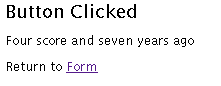
    out.println("<h2>Button Clicked</h2>");

    String DATA = request.getParameter("DATA");

    if(DATA != null){
      out.println(DATA);
    } else {
      out.println("No text entered.");
    }

    out.println("<P>Return to
	<A HREF=/old?u=http%3A%2F%2Fdeveloper.java.sun.com%2Fdeveloper%2FonlineTraining%2FProgramming%2FBasicJava1%2F%26quot%3B..%2FsimpleHTML.html%26quot%3B%26%2362%3BForm%26%2360%3B%2FA%26%2362%3B%26quot%3B%29%3B&y=1999
    out.close();
  }
}
Class and Method DeclarationsAll servlet classes extend theHttpServlet abstract class.
HttpServlet simplifies writing HTTP servlets by providing a
framework for handling the HTTP protocol. Because HttpServlet
is abstract, your servlet class must extend it and override at
least one of its methods. An abstract class is a class
that contains unimplemented methods and cannot be instantiated itself.
public class ExampServlet extends HttpServlet {
  public void doPost(HttpServletRequest request,
         HttpServletResponse response)
         throws ServletException, IOException
  {
The ExampServlet class is declared public
so the web server that runs the servlet, which is not
local to the servlet, can access it.
The
The
In short,
The parameter list for the
The Method ImplementationThe first part of thedoPost method uses
the response object to create an HTML page.
It first sets the response content type to be
text/html,
then gets a PrintWriter object for formatted text output.
response.setContentType("text/html");
    PrintWriter out = response.getWriter();

    out.println("<title>Example</title>" +
       "<body bgcolor=#FFFFFF>");

    out.println("<h2>Button Clicked</h2>");
The next line uses the request object to
get the data from the text field on the form and store it
in the DATA variable. The getparameter
method gets the named parameter, returns null if the
parameter was not set, and an empty string if the parameter
was sent without a value.
String DATA = request.getParameter("DATA");
The next part of the doPost method gets the data out of the
DATA
parameter and passes it to the response object to add to the
HTML response page.
    if(DATA != null){
      out.println(DATA);
    } else {
      out.println("No text entered.");
    }
The last part of the doPost method creates a link to take the
end user from the HTML response page back to the original form, and
closes the response.
    out.println("<P>Return to
        <A HREF=/old?u=http%3A%2F%2Fdeveloper.java.sun.com%2Fdeveloper%2FonlineTraining%2FProgramming%2FBasicJava1%2F%26quot%3B..%2FsimpleHTML.html%26quot%3B%26%2362%3BForm%26%2360%3B%2FA%26%2362%3B%26quot%3B%29%3B&y=1999
    out.close();
  }
More InformationYou can find more information on servlets in the Servlets trail in The Java Tutorial.[TOP] |

 The HTML file and form are similar to the simple
application and applet examples in
The HTML file and form are similar to the simple
application and applet examples in